
React provides two built-in hooks with similar names but distinct behaviors: useEffect and useLayoutEffect. While they share some similarities, their execution timing and use cases differ significantly.
useEffect(() => {
  // content
}, []);

useLayoutEffect(() => {
  // content
}, []);
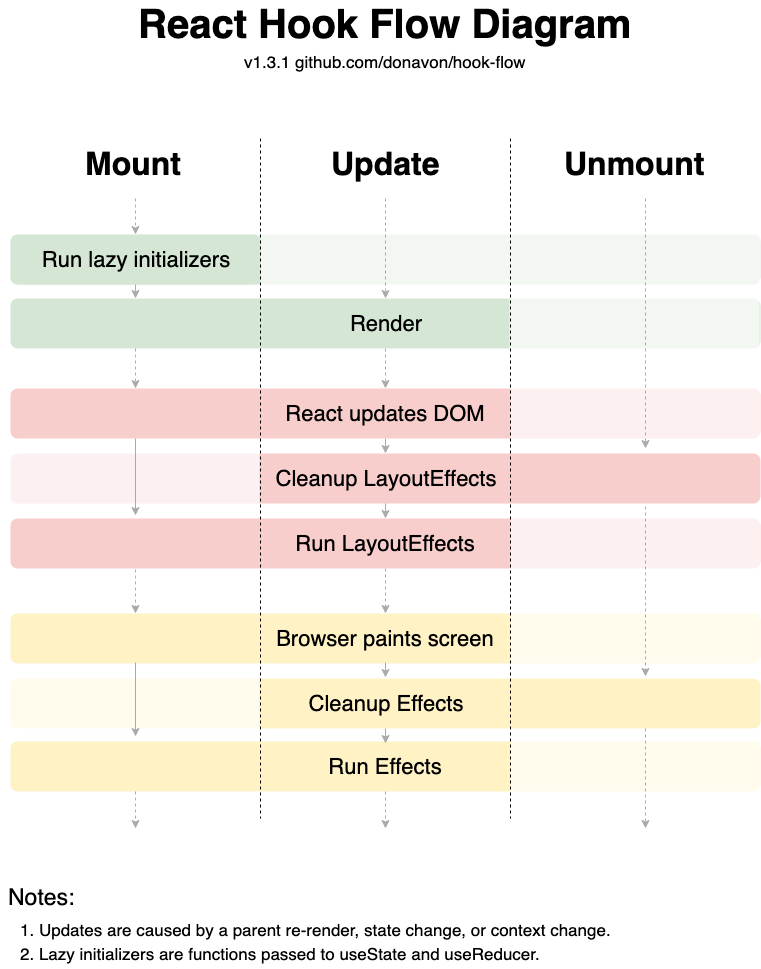
Take a look at this hook flow diagram below to know when the hooks are called.
useEffect
- Runs after the browser paints the screen
- Runs asynchronously
useLayoutEffect
- Runs before the browser paints the screen
- Runs synchronously
The useEffect is useful for doing things that don't need to happen right away due to its asynchronous nature. For example, you can use it to fetch data from the server, log something to the console, or send an analytics event.
const DataFetchingComponent = () => {
  const [data, setData] = useState(null);

  useEffect(() => {
    const fetchData = async () => {
      const response = await fetch('https://api.example.com/data');
      const result = await response.json();
      setData(result);
    };
    fetchData();
  }, []);

  return <div>{/* Render data */}</div>;
};
The useLayoutEffect hook is ideal for making immediate visual changes or performing DOM measurements before the browser paints. It's particularly useful for tasks like measuring element dimensions, adjusting element positions, or scrolling to specific locations. Additionally, if you notice flickering in your UI, switching from useEffect to useLayoutEffect can often resolve the issue by ensuring changes are applied synchronously before the screen updates.
const ScrollToTopComponent = () => {
  useLayoutEffect(() => {
    window.scrollTo(0, 0);
  }, []);

  return <div>{/* Component content */}</div>;
};
Summary
In this article, we explored the key differences between React's useEffect and useLayoutEffect hooks:
Execution Timing:
useEffectruns after the browser paints the screen.useLayoutEffectruns before the browser paints the screen.
Synchronicity:
useEffectis asynchronous.useLayoutEffectis synchronous.
Use Cases:
useEffectis ideal for non-urgent tasks like data fetching, logging, or analytics.useLayoutEffectis best for immediate visual changes, DOM measurements, or fixing UI flickering issues.
Performance Considerations:
useEffectis generally preferred for better performance in most scenarios.useLayoutEffectshould be used sparingly, only when synchronous updates are necessary.
Understanding these differences helps in choosing the right hook for specific scenarios, optimizing React component behavior and performance.